Halaman

Sabtu, 04 Mei 2013

LAPORAN PRAKTIKUM 2.8.1 Basic Static Route Configuration Lab

LAPORAN PRAKTIKUM
2.8.1 Basic Static Route Configuration Lab

Markhamah Tri Utami 
12 615 056

Tujuan Pembelajaran:
Melalui praktikum ini diharapkan mampu 
  • Menyesuaikan kabel jaringan sesuai dengan topologi diagram 
  • Menghapus startup configuration and reload a router to the default state. 
  • Menkonfigurasi dasar pada router. 
  • Interpret debug ip routing output. 
  • Menkonfigurasi dan mengaktifkan Serial and Ethernet interfaces. 
  • Melakukan uji koneksi 
  • Mengumpulkan informasi penyebab gagalnya koneksi antara dua devices. 
  • Mengkonfigurasi static route menggunakan  intermediate address. 
  • Mengkonfigurasi static route menggunakan an exit interface. 
  • Membandingkan static w/intermediate address dengan static w/exit interface. 
  • Mengkonfigurasi sebuah default static route. 
  • Mengkonfigurasi sebuah summary static route. 
  • Dokumen implementasi jaringan 
Scenario
          In this lab activity, you will create a network that is similar to the one shown in the Topology Diagram. Begin by cabling the network as shown in the Topology Diagram. You will then perform the initial router configurations required for connectivity. Use the IP addresses that are provided in the Topology Diagram to apply an addressing scheme to the network devices. After completing the basic configuration, test connectivity between the devices on the network. First test the connections between directly connected devices, then test connectivity between devices that are not directly connected. Static routes must be configured on the routers for end-to-end communication to take place between the network hosts. You will configure the static routes that are needed to allow communication between the hosts. View the routing table after each static route is added to observe how the routing table has changed 

Langkah Praktikum
Topology Diagram


Hubungkan masing-masing PC ke switch dengan menggunakan kabel straight. 
  
Langkah 1 
Pada router, masuk ke modus konfigurasi global untuk mengkonfigurasi dasar konfigurasi perintah global, termasuk;  hostname, no ip domain-lookup, enable secret.

Langkah 2
Konfigurasi konsol dan virtual password garis terminal pada masing-masing router  
Pertama yaitu; mengatur router 1 terlebih dahulu dengan membuka tab CLI pada router 1 dan ketik script sebagai berikut:

Router1#enable
Router1#config t
Enter configuration commands, one per line.  End with CNTL/Z.
Router1(config)#hostname R1
R1(config)#no ip domain-lookup
R1(config)#no enable password
R1(config)#line console 0
R1(config-line)#password cisco
R1(config-line)#login
R1(config-line)#exit
R1(config)#line vty 0 4
R1(config-line)#password cisco
R1(config-line)#login
R1(config-line)#exit
R1(config)#end

R1#debug ip routing
IP routing debugging is on
R1#config t
Enter configuration commands, one per line.  End with CNTL/Z.
R1(config)#interface fa0/0
R1(config-if)#ip address 172.16.3.1 255.255.255.0
R1(config-if)#no shutdown
R1(config-if)#exit
R1(config)#interface serial 0/0/0
R1(config-if)#ip address 172.16.2.1 255.255.255.0
R1(config-if)#no shutdown
R1(config-if)#exit
R1(config)#interface serial 0/0/0
R1(config-if)#ip address 172.16.2.1 255.255.255.0
R1(config-if)#clock rate 64000
R1(config-if)#no shutdown
R1(config-if)#exit
R1(config)#ip route 0.0.0.0 0.0.0.0 172.16.2.2
R1(config)#exit
R1#

         Jika script sudah selesai di ketik, coba buka tab Config nya dan lihat perubahan yang terjadi. Pada Global Setting, display namedan hostname sudah berubah menjadi R1


Router 2

Router2#config t
Enter configuration commands, one per line.  End with CNTL/Z.

Router2(config)#hostname R2
R2(config)#no ip domain-lookup
R2(config)#no enable password
R2(config)#line con 0
R2(config-line)#password cisco
R2(config-line)#login
R2(config-line)#exit
R2(config)#line vty 0 4
R2(config-line)#password cisco
R2(config-line)#login
R2(config-line)#exit
R2(config)#interface fa0/0
R2(config-if)#ip address 172.16.1.1 255.255.255.0
R2(config-if)#no shutdown
R2(config-if)#exit
R2(config)#interface serial 0/0/0
R2(config-if)#ip address 172.16.2.2 255.255.255.0
R2(config-if)#clock rate 64000
R2(config-if)#no shutdown
R2(config-if)#exit
R2(config)#interface serial 0/0/1
R2(config-if)#ip address 192.168.2.1 255.255.255.0
R2(config-if)#clock rate 64000
R2(config-if)#no shutdown
R2(config-if)#exit
R2(config)#ip route 192.168.2.0 255.255.255.0 192.168.1.1
R2(config)#ip route 172.16.3.0 255.255.255.0 serial0/0/0
R2(config)#exit

       Lalu buka tab Config nya dan lihat perubahan yang terjadi. Pada Global Setting, display name dan hostname sudah berubah menjadi R2.

Router 3
Router3#config t 
Enter configuration commands, one per line.  End with CNTL/Z.

Router3(config)#hostname R3
R3(config)#no ip domain-lookup
R3(config)#no enable password
R3(config)#line con 0
R3(config-line)#password cisco
R3(config-line)#login
R3(config-line)#exit
R3(config)#line vty 0 4
R3(config-line)#password cisco
R3(config-line)#login
R3(config-line)#exit
R3(config)#interface fa0/0
R3(config-if)#ip address 192.168.2.1 255.255.255.0
R3(config-if)#no shutdown
R3(config-if)#exit
R3(config)#interface serial 0/0/1
R3(config-if)#ip address 192.168.1.1 255.255.255.0
R3(config-if)#clock rate 64000
R3(config-if)#no shutdown
R3(config-if)#exit
R3(config)#ip route 172.16.0.0 255.255.255.0 192.168.1.2
R3(config)#exit

         Pada Global Setting, display name diganti jadi R3 dan hostname sudah berubah jadi R3


Langkah 3
Mengatur konfigurasi IP di setiap PC
PC1

PC2
PC3

Hasil Praktikum

PC1

Rabu, 17 April 2013

LAPORAN 9.9.1: Skills Integration Challenge-Switched Ethernet

LAPORAN JARINGAN KOMPUTER
9.9.1: Skills Integration Challenge-Switched Ethernet 

Markhamah Tri Utami
12 615 056

Tujuan Praktikum :
1.  Mahasiswa dapat mengetahui cara menghitung IP
2.  Mahasiswa dapat menetukan subnetting
3.  Mahasiswa dapat melakukan uji koneksi

Pendahuluan
         Ethernet switch merupakan sebuah network switch yang mentransmisikan data pada Ethernet standard rates. Ethernet merupakan sebuah kumpulan dari tool-tool jaringan komputer yang disatukan dengan satu set standar tertentu. Network switch merupakan istilah lainnya untuk sebuah perangkat yang menghubungkan bagian-bagian berbeda pada sebuah jaringan komputer bersama-sama.
        Sebuah Ethernet switch harus mampu mentransmisikan data pada tingkatan tertentu untuk memastikan komputer dan semua perangkat yang terhubung dapat berfungsi dengan baik dan merupakan pusat kontrol lalu lintas (traffic control center) pada jaringan LAN (Local Area Network).

Langkah Praktikum
Topology Diagram
Addressing Table
Background:
You have been asked to repair some problems in the network model related to the Ethernet LAN connected to R2-Central. 
Task 1: IP Subnet planning
You have been given an IP address block of 192.168.111.0 /24. You must provide for the three existing networks.

Subnet Assignments Are:
  • 1st subnet, existing student LAN, up to 100 hosts; (Fa0/0 on R2-Central)
  • 2rd subnet, existing ISP LAN, up to 5 hosts; (already configured)
  • 3rd subnet, existing WAN, point-to-point link; (already configured)

Interface IP addresses:
  • The server, R1-ISP, and R2-Central's serial interface have already been configured.
  • For R2-Central's Fa0/0 interface, use the highest usable address on the existing student LAN subnet.
  • For hosts 1A and 1B, use the first 2 IP addresses (two lowest usable addresses) on the existing student LAN subnet.
  • For Hosts 1A and 1B, the DNS server is 192.168.111.133 /29.
  • The next hop router (to which the default route should point), R1-ISP, has an IP address of 192.168.111.138 /30.

Task 2: Repair problems with the Ethernet switched LAN.
  • PC 1B has a wireless card and cannot be connected to the switch; add the Fast Ethernet Interface card PT-HOST-NM-1CFE to PC 1B.
  • Connect this newly installed Fast Ethernet NIC to the Fa0/2 interface on the switch.
  • Connect PC 1A to the Fa0/1 interface on the switch.
  • Connect the Fa0/24 interface on the switch to the R2-Central Fa0/0 interface.

      Apparently the Ethernet speed and duplex settings for the R2-Central Fa0/0 interface, the S1-Central switch interfaces (Fa0/1, Fa0/2, and Fa0/24), and the PC 1A interfaces are incorrect. Set all Ethernet interfaces to auto negotiate speed and duplex (which will achieve Full Duplex, 100 Mbps operation, if both ends of the link can support it). For all devices, make sure the power is on to the device and to the interfaces (make sure the Ethernet interfaces are not shut down). Add IP addresses to the router Fa0/0 interface and to the two PCs-- highest usable subnet address assigned to the gateway; two lowest usable addresses to the PCs. The static route on the R2-Central should be a default static route which points via R1-ISP's serial interface IP address. These procedures were explained in the Chapter 5 and 6 Skills Integration Challenges.
Task 3: Test the Network.
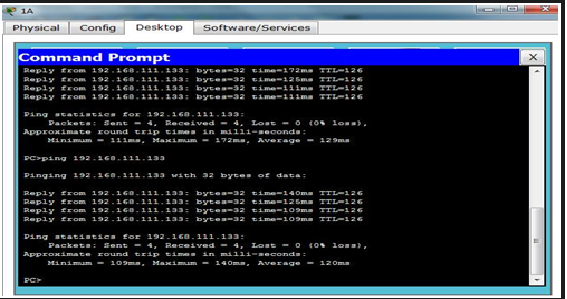
Use ping, trace, web traffic, and the Inspect tool to trace packet flow in simulation mode, with HTTP, DNS, TCP, UDP, ICMP, and ARP viewable, to test your understanding of how the network is operating.
Reflection:
       The two Layer 2 (and Layer 1 technologies) in this model are a serial connection (between the routers) and the Ethernet LANs (for the ISP server and with S1-Central switch). Compare and contrast the serial connection with Ethernet. In a future course you will learn much more about switched Ethernet technologies.
Setelah membaca instruksi diatas yang pertama adalah menyiapkan IP address dan subnest mask untuk jumlah host 100. Caranya adalah dengan melakukan subnetting langsung saja kita melakukan subnetting untuk kasus ini :
·         R2 – Central
Analisa
IP yang saya gunakan berada di kelas C dengan subnest mask /25 yang berarti 11111111.11111111.11111111.10000000 (255.255.255.128).
      Setelah itu untuk menentukan host yaitu dengan cara menggunakan angka yang lebih dari 100 rumusnya (2n-2), n adalah jumlah 0 yang ada di oktet terakhir. 128 – 2 = 126. Jumlah host sudah dapat sekarang adalah waktunya memasukkan IP dan subnest mask kedalam router

Konfigurasi router
R2-Central>enable
R2-Central#config t
Enter configuration commands, one per line.  End with CNTL/Z.
R2-Central(config)#interface fa0/0
R2-Central(config-if)#ip address 192.168.111.126 255.255.255.128
R2-Central(config-if)#no shutdown
R2-Central(config-if)#
%LINK-5-CHANGED: Interface FastEthernet0/0, changed state to up
%LINEPROTO-5-UPDOWN: Line protocol on Interface FastEthernet0/0, changed state to up
R2-Central(config-if)#end
R2-Central#
%SYS-5-CONFIG_I: Configured from console by console
R2-Central#
Setelah konfigurasi router selesai selanjutnya adalah melakukan konfigurasi switch
·   S1 – Central
    S1-Central > enable
    S1-Central # configurasi terminal
    S1-Central (config)# interface fa0/1
    S1-Central (config-if)# description Connection to host computer 1A
    S1-Central (config)# interface fa0/2
    S1-Central (config-if)# description Connection to host computer 1B
    S1-Central (config)# interface fa0/3
    S1-Central (config-if)# description Connection to R2-Central
    S1-Central (config-if)# end
    S1-Central copy run start
    Destination filename [startup-config]?
    Building configuration...
    [OK]
    S1-Central #
       Konfigurasi semua sudah dilakukan seteleh melakukan pengaturan pada ethernet speed dan duplex pada R2-Central Fa0/0 interface, the S1-Central switch interfaces (Fa0/1, Fa0/2, and Fa0/24), dan PC 1A dan PC 1B

Lalu menentukan Next hop pada R2-Central

Hasil Praktikum
ping ke PC


Minggu, 14 April 2013

Laporan Activity 6.7.4: IPv4 Address Subneting Part 2

Activity 6.7.4: IPv4 Address Subneting Part 2

Markhamah Tri Utami
12 615 056


Problem 1

Host IP Address       172.30.1.33

Subnet  Mask            255.255.255.0

1.   Merubah IP Address dan Subnet Mask kedalam bilangan biner.

      IP Address          172.30.1.33             10101100     00011110     00000001        00100001

      Subnet Mask        255.255.255.0         11111111     11111111     11111111        00000000
  
2.   Mencari Subnet Address for this IP Address dengan cara menjumlahkan bilangan biner dari IP 
      Address dengan Subnet mask menggunakan operator AND.


      IP Address          172.30.1.33             10101100     00011110     00000001        00100001

      Subnet Mask        255.255.255.0         11111111     11111111     11111111        00000000      

      Subnet Add         172.30.1.0               10101100     00011110     00000001        00000000

3. Menentukan alamat bit yang berisi informasi jaringan dan yang berisi informasi host.
4.   Menentukan subnet range dan host range.                                                            


5.   Menentukan First Host, Last Host dan Broadcast.

      IP Address           172.30.1.33             10101100     00011110     00000001        00100001

      Subnet Mask        255.255.255.0         11111111     11111111      11111111         00000000      

      Subnet Add          172.30.1.0               10101100     00011110     00000001        00000000

      First Host             172.30.1.1               10101100     00011110     00000001        00000001

      Broadcast             172.30.1.255           10101100     00011110     00000001        11111111

6.   Menentukan Number of Subnets dengan menghitung bit pada subnet counting range.  Gunakan

      rumus 2 pangkat n, dimana n adalah jumlah dari bit yang ada pada subnet counting range.

      Number of Subnet Bits                       8 bits

      Number of Subnets                             28 = 256 subnets
7.   Menentukan Number Usable Hosts per Subnet dengan menghitung bit pada host range yaitu

      Gunakan rumus 2 pangkat n dikurang 2.

      Number of Host bits per Subnet         8 bits

      Number of Usable Hosts per Subnet  28 – 2 = 256 -2 = 254 hosts per subnet

8.   Maka Hasilnya


Problem  2

Host IP Address          172.30.1.33

Subnet Mask               255.255.255.252

1. Merubah IP Address dan Subnet Mask kedalam bilangan biner.


      IP Address          172.30.1.33             10101100     00011110     00000001        00100001

      Subnet Mask        255.255.255.0     11111111     11111111     11111111        00000000      


2.  Mencari Subnet Address for this IP Address dengan cara menjumlahkan bilangan biner dari IP 

     Address dengan Subnet mask menggunakan operator AND.

      IP Address          172.30.1.33             10101100     00011110     00000001        00100001

      Subnet Mask        255.255.255.0     11111111     11111111     11111111        11111100      

      Subnet Add         172.30.1.32             10101100     00011110     00000001        00100000


3.  Menentukan alamat bit yang berisi informasi jaringan dan yang berisi informasi host.
   

4.   Menentukan subnet range dan host range.


5.   Menentukan First Host, Last Host dan Broadcast

      IP Address          172.30.1.33             10101100     00011110     00000001        00100001

      Subnet Mask       255.255.255.252     11111111     11111111     11111111        11111100      

      Subnet Add         172.30.1.32             10101100     00011110     00000001        00100000

      First Host            172.30.1.1               10101100     00011110     00000001        00000001

      Last Host             172.30.1.34             10101100     00011110     00000001        00100010

      Broadcast            172.30.1.35             10101100     00011110     00000001        11111111

6.  Menentukan Number of Subnets dengan menghitung bit pada subnet counting range yaitu 14. 

     Gunakan rumus 2 pangkat n, dimana n adalah jumlah dari bit yang ada pada subnet counting   

     range.

          Number of Subnet Bits                       14 bits
          Number of Subnets                             214 = 163684 subnets

7.  Menentukan Number Usable Hosts per Subnet dengan menghitung bit pada host range yaitu 2.
      Gunakan rumus 2 pangkat n dikurang 2.

            Number of Host Bits per Subnet        2 bits

            Number of Usable Hosts per Subnet  22-2=4-2=2 hosts per subnet

8.   Maka hasilnya


Problem 3
Host IP Address       192.192.10.234
Subnet Mask           255.255.255.0

1.  Merubah IP Address dan Subnet Mask kedalam bilangan biner.

      IP Address          192.192.10.234       11000000     11000000     00001010        11101010
      Subnet Mask        255.255.255.252     11111111     11111111     11111111        00000000    
   
2.  Mencari Subnet Address for this IP Address dengan cara menjumlahkan bilangan biner dari IP
     Address dengan Subnet mask menggunakan operator AND.

      IP Address          192.192.10.234       11000000     11000000     00001010        11101010
      Subnet Mask        255.255.255.0         11111111     11111111     11111111        00000000    
      Subnet Add         192.192.10.0           11000000     11000000     00001010        00000000

3. Menentukan alamat bit yang berisi informasi jaringan dan yang berisi informasi host.


4.  Menentukan host dan range


5.  Menetukan First Host, Last Host dan Broadcast

      IP Address          192.192.10.234       11000000     11000000     00001010        11101010
      Subnet Mask       255.255.255.0         11111111     11111111     11111111        00000000    
      Subnet Add         192.192.10.0           11000000     11000000     00001010        00000000
      First Host            192.192.10.1           11000000    11000000     00001010        00000001
      Last Host            192.192.10.254       11000000     11000000     00001010        11111110
      Broadcast            192.192.10.255       11000000     11000000     00001010        11111111
   
6.  Menentukan Number of Subnets dengan menghitung bit pada subnet counting range yaitu 8.
     Gunakan rumus 2 pangkat n, dimana n adalah jumlah dari bit yang ada pada subnet counting range.

      Number of Subnet Bits                       8 bits
      Number of Subnet                              28= 256 subnets

7.  Menentukan Number Usable Hosts per Subnet dengan menghitung bit pada host range yaitu 8.
     Gunakan rumus 2 pangkat n dikurang 2.

      Number of Host Bits per Subnet        8 bits
      Number of Usable Hosts per Subnet  28-2 = 256-2 = 254 hosts per subnet

8. Maka Hasilnya


Problem 4

Problem 5


Sabtu, 13 April 2013

Activity 6.7.3: IPv4 Address Subnetting Part 1


Nama    : Markhamah Tri Utami
NIM      : 12615056

Activity 6.7.3: IPv4 Address Subnetting Part 1


Problem 1
Host IP Address   : 172.30.1.33
Network Mask      : 255.255.0.0
1.   Konversikan IP Address dan Network Mask ke biner:
                                    172                  30                      1                      33
      IP Address            10101100        00011110        00000001        00100001             
      Network Mask      11111111        11111111        00000000        00000000       
                                    255                  255                    0                      0

2.   operasi AND pada IP Address dengan Subnet Mask
      IP Address            10101100        00011110          00000001        00100001                  
      Subnet Mask         11111111        11111111          00000000        00000000
      Network Address   10101100        00011110          00000000        00000000
                                      172                    30                     0                   0

3.   Network Address   10101100        00011110          00000000        00000000
      Subnet Mask         11111111        11111111          00000000        00000000
      Broadcast              10101100        00011110          11111111        11111111      
                                      172                 30                    255                   255        
      Host bits : 16
      Total number of hosts :
      216 = 65,536
       65,536  - 2 = 65,534
Host IP Address                     172.30.1.33
Network Mask                        255.255.0.0(/16)
Network Address                   172.30.0.0
Network Broadcast Address  172.30.255.255
Total Number of Host Bits     65,534
Number of Hosts


Problem 2
Host IP Address   : 172.30.1.33
Network Mask      : 255.255.255.0

1.   Konversikan IP Address dan Network Mask ke biner:
                                    172                  30                      1                   33
      IP Address            10101100        00011110        00000001        00100001             
      Network Mask      11111111        11111111        11111111         00000000       
                                     255                   255                255                  0

2.   operasi AND pada  IP Address dengan Subnet Mask
      IP Address             10101100        00011110          00000001        00100001                  
      Subnet Mask          11111111        11111111          11111111        00000000
      Network Address    10101100        00001110          00000001        00000000
                                       172                 30                     1                      0

3.   Network Address   10101100        00011110          00000000        00000000
      Subnet Mask         11111111        11111111          11111111        00000000
      Broadcast              10101100        00011110          11111111        11111111      
                                       172                   30                  255                255        
      Host bits :
      Total number of hosts :
      224 = 16.777.216
      16.777.216  - 2 = 16.777.214
Host IP Address                      172.30.1.33
Network Mask                        255.255.255.0(/24)
Network Address                    172.30.1.0
Network Broadcast Address   172.30.255.255
Total Number of Host Bits       16.777.214
Number of Hosts 


Problem 3
Host IP Address    : 192.168.10.234
Network Mask      : 255.255.255.0

1.   Konversikan IP Address dan Network Mask ke biner:
                                    192                  168                    10                    234
      IP Address            11000000        10101000        00001010        11101010                         
      Network Mask      11111111        11111111        11111111        00000000       
                                    255                  255                    255                  0

2.   operasi AND pada  IP Address dengan Subnet Mask
      IP Address            11000000        10101000          00001010        11101010                              
      Subnet Mask         11111111        11111111          11111111        00000000
      Network Address   11000000        10101000          00001010        00000000
                                     192                     168                 10                   0

3.   Network Address  10101100        11110000          00000000        00000000
      Subnet Mask         11111111        11111111          00001010        00000000
      Broadcast              10101100        10101000          00001010        11111111      
                                      192                    30                   10                  255        
      Host bits :
      Total number of hosts :
      224 = 16.777.216
      16.777.216  - 2 = 16.777.214
Host IP Address                      192.168.10.234
Network Mask                        255.255.255.0(/24)
Network Address                    192.168.10.0
Network Broadcast Address   192.168.10.255
Total Number of Host Bits       16.777.214
Number of Hosts


Problem 4
Host IP Address   : 172.17.99.71
Network Mask      : 255.255.0.0

1.   Konversikan IP Address dan Network Mask ke biner:
                                     172                  17                      99                71
       IP Address            10101100        00010001        01100011        0100 0111                        
       Network Mask      11111111        11111111        00000000        00000000       
                                      255                  255                    0                  0

2.   operasi AND pada  IP Address dengan Subnet Mask
      IP Address            10101100        00010001          01100011        0100 0111                             
      Subnet Mask         11111111        11111111          00000000        00000000
      Network Address   10101100        00010001          01100011        00000000      
                                     172                     17                   99                   0

3.   Network Address   10101100        11110000          00000000        00000000
      Subnet Mask         11111111        11111111          00000000        00000000
      Broadcast              10101100        10101000          11111111         11111111      
                                      172                    17                  255                  255
     
      Host bits : 16
      Total number of hosts :
      216 = 65.536
       65.536  - 2 = 65.534
Host IP Address                     172.17.99.71
Network Mask                       255.255.0.0(/16)
Network Address                   172.17.99.0
Network Broadcast Address   172.17.255.255
Total Number of Host Bits       65,534
Number of Hosts


Problem 5
Host IP Address    : 192.168.3.219
Network Mask      : 255.255.0.0

1.   Konversikan IP Address dan Network Mask ke biner:
                                     192                  168                  3                   219
      IP Address            1100 0000       10101000        11000000        11011011              
      Network Mask       11111111        11111111        00000000        00000000       
                                    255                  255                    0                      0

2.   operasi AND pada  IP Address dengan Subnet Mask
      IP Address            1100 0000       10101000          11000000        11011011                              
      Subnet Mask         11111111        11111111          00000000        00000000
      Network Address   1100 0000       10101000          00000000        00000000      
                                      192                 168                    0                     0

3.   Network Address   10101100        11110000          00000000        00000000
      Subnet Mask         11111111        11111111          00001010        00000000
      Broadcast              1100 0000       10101000          11111111        11111111      
                                     192                  168                  255                   255
     
      Host bits : 16
      Total number of hosts :
      216 = 65.536
       65.536  - 2 = 65.534
Host IP Address                     192.168.3.219
Network Mask                        255.255.0.0(/16)
Network Address                   192.168.0.0
Network Broadcast Address   192.168.255.255
Total Number of Host Bits       65.534
Number of Hosts


Problem 6
Host IP Address    : 192.168.3.219
Network Mask      : 255.255.255.254

1.   Konversikan IP Address dan Network Mask ke biner:
                                     192                 168                  3                    219
      IP Address            1100 0000       10101000        11000000        11011011             
      Network Mask      11111111        11111111        11111111        111 11110      
                                    255                  255                    255              254

2.   operasi AND pada  IP Address dengan Subnet Mask
      IP Address            1100 0000       10101000          11000000         11011011                              
      Subnet Mask         11111111        11111111          11111111         111 11110
      Network Address   1100 0000       10101000          11000000         11011010      
                                     192                 168                 3                        218

3.   Network Address   10101100        11110000          00000000        00000000
      Subnet Mask          11111111        11111111          11111111       111 11110
      Broadcast              1100 0000       10101000          11111111        110 11111     
                                      192                 168                  255                 223
     
      Host bits : 27
      Total number of hosts :
      227 = 134.217.728
      134.217.728 - 2 = 134.217.726
Host IP Address                     192.168.3.219
Network Mask                        255.255.255.254(/27)
Network Address                   192.168.3.218
Network Broadcast Address  192.168.255.223
Total Number of Host Bits     134.217.726
Number of Hosts